코드 인터페이스로 간결하게 액션 호출하기

Ash 리소스의 액션을 사용하려면 다음과 같이 호출할 수 있었다.

iex> Helpdesk.Support.Ticket
    |> Ash.Changeset.for_create(:open, %{subject: "Issue Ticket"})
    |> Ash.create!()

하지만 코드가 장황하고 읽기 어려운 감이 있다. 매번 Ash 모듈을 참조하는 것도 좋아보이지 않는다.

다음과 같이 사용할 수 있으면 좋을 것 같다.

iex> Helpdesk.Support.open_ticket(subject)

Ash 에서는 코드 인터페이스를 통해 보다 간결하게 액션을 호출할 수 있는 기능을 제공한다. 공식 문서의 내용을 따라가며 코드 인터페이스의 동작과 활용 가능성에 대해 살펴 보자.

도메인에서 코드 인터페이스 정의

다음과 같은 액션이 정의되어 있다고 가정 하자.

defmodule Helpdesk.Support.Ticket do
  ...

  actions do
    defaults [:read]

    create :open do
      accept [:subject]
      change relate_actor(:owner)
    end

    ...
  end
end

다음과 같이 도메인 정의에서 코드 인터페이스를 추가하면

resources do
  resource Ticket do
    define :open_ticket, args: [:subject], action: :open
  end
end

액션을 호출하는 곳 에서는 다음과 같이 사용할 수 있다.

# 기본 사용
iex> Helpdesk.Support.open_ticket("버그 수정")
{:ok, %Ticket{...}}

# ! 버전은 결과를 직접 반환
iex> Helpdesk.Support.open_ticket!("버그 수정")
%Ticket{...}

# 옵션과 함께 사용
iex> Helpdesk.Support.open_ticket("긴급 이슈", actor: current_user)

리소스에서 코드 인터페이스 정의

리소스 코드 에서도 코드 인터페이스를 정의할 수 있다.

code_interface do
  # 함수 이름과 일치하므로 open 액션은 생략 가능
  define :open, args: [:subject]
end

다음과 같이 호출할 수 있다.

iex> Helpdesk.Support.Ticket.open(subject)

이렇게 인터페이스로 정의된 함수는 h 명령어를 통해 사용 방법에 대한 문서도 제공된다.

iex> h Helpdesk.Support.open_ticket

              def open_ticket(subject, params \\ nil, opts \\ nil)              

Calls the open action on Helpdesk.Support.Ticket.

# Arguments

  • subject
## Options

  • :upsert? (t:boolean/0) - If a conflict is found based on the primary
    key, the record is updated in the database (requires upsert support) The
    default value is false.
  • :return_skipped_upsert? (t:boolean/0) - If true, and a record was not
    upserted because its filter prevented the upsert, the original record
    (which was not upserted) will be returned. The default value is false.
  ...

코드 인터페이스 사용하기

액션 타입에 따른 인수

코드 인터페이스로 정의된 함수는 액션 타입에 따라 자동으로 필요한 인수를 받을 수 있도록 생성된다.

업데이트/삭제 액션: 액션의 대상이 필요하므로 기본적으로 첫 번째 인수로 레코드 또는 체인지셋을 받는다.

# 업데이트
iex> ticket = Helpdesk.Support.get_ticket!(ticket_id)
iex> Helpdesk.Support.update_ticket(ticket, %{status: :closed})

# 삭제
iex> Helpdesk.Support.delete_ticket(ticket)

읽기 액션: 액션의 대상이 필요하지는 않지만 조회 대상을 필터링 할 수 있도록 `query` 옵션을 통해 쿼리를 전달할 수 있다.

# 쿼리 없이 전체 조회
iex> Helpdesk.Support.list_tickets()

# Ash.Query 객체로 필터링
iex> query = Ticket |> Ash.Query.filter(status == :open)
iex> Helpdesk.Support.list_tickets(query: query)

# 키워드 리스트로 필터링
iex> Helpdesk.Support.list_tickets(
  query: [
    filter: [status: :open],
    sort: [created_at: :desc]
  ]
)

선택적 인수

필수 인수 외에도 선택적으로 옵션과 액션 입력을 전달할 수 있다. 옵션은 Ash가 제공하는 실행 방식 제어(actor, authorize? 등)를 위한 것이고, 액션 입력은 액션에 정의된 argument를 전달하기 위한 것이다.

# 옵션만
Helpdesk.Support.open_ticket("버그", actor: current_user)

# 액션 입력만
Accounts.register_user(username, password, %{referral_code: "ABC"})

# 둘 다
Accounts.register_user(
  username, 
  password,
  %{referral_code: "ABC"},  # 액션 입력 (맵)
  tenant: "org_22"          # 옵션 (키워드 리스트)
)

키워드 리스트는 옵션으로, 맵은 액션 입력으로 자동 구분된다.

get_by 함수

코드 인터페이스를 정의하는 define 매크로에는 get_by 라는 옵션이 있다. 먼저 get_by 옵션을 사용하지 않은 코드 인터페이스 정의를 다시 살펴보자.

resources do
  resource Ticket do
    define :read_ticket, action: :read
  end
end

이 인터페이스는 Helpdesk.Support.read_ticket() 으로 사용할 수 있는데 기본적으로 목록을 반환하는 인터페이스이다. 이 상황에서 단일 레코드를 획득하고 싶다면 query 를 사용해서 필터링 하거나 구분자를 인자로 받는 액션을 별도로 정의해서 코드 인터페이스로 연결해야 한다. 혹은 코드 인터페이스를 사용하지 않고 Ash.get!(id) 등을 사용해 단일 레코드를 획득할 수도 있지만 컨트롤러나 LiveView에서 Ash.get!을 직접 사용하는 것은 Ecto에서 컨텍스트 모듈 밖에서 Repo.getRepo.preload를 직접 사용하는 것과 같은 안티패턴이므로 피해야 할 패턴이라고 한다.

# ❌ 이렇게 하지 마세요
defmodule HelpdeskWeb.TicketController do
  def show(conn, %{"id" => id}) do
    ticket =
      Helpdesk.Support.Ticket
      |> Ash.get!(id)
      |> Ash.load!(comments: [:author])
    
    render(conn, :show, ticket: ticket)
  end
end

따라서 코드 인터페이스를 통해 단일 레코드를 획득하는 함수를 정의하려면 get_by 옵션으로 함수를 정의하는 것을 권장한다.

resources do
  resource Ticket do
    define :get_ticket_by_id, action: :read, get_by: [:id]
  end
end

이제 다음과 같이 사용할 수 있다.

# 컨트롤러에서
defmodule HelpdeskWeb.TicketController do
  def show(conn, %{"id" => id}) do
    ticket = Helpdesk.Support.get_ticket_by_id!(id)
    render(conn, :show, ticket: ticket)
  end
end

update/destroy 액션에서의 get_by

update와 destroy 액션은 기본적으로 레코드 인스턴스를 첫 번째 인자로 받는다. 따라서 코드 인터페이스를 사용하더라도 먼저 레코드를 조회한 후 업데이트나 삭제를 수행해야 한다.

code_interface do
  define :update_ticket, action: :assign
  define :delete_ticket, action: :destroy
end

이 경우 다음과 같이 사용해야 한다.

# 먼저 레코드 조회
ticket = Helpdesk.Support.get_ticket_by_id!(ticket_id)

# 그 다음 업데이트
Helpdesk.Support.update_ticket(ticket, %{representative_id: rep_id})

# 또는 삭제
Helpdesk.Support.delete_ticket(ticket)

레코드를 먼저 조회한 후 업데이트나 삭제를 수행하는 두 단계의 코드를 작성해야 하므로, 컨트롤러나 LiveView에서 코드가 길어지고 중간 변수를 관리해야 하는 번거로움이 있다. 이런 상황에서 get_by 옵션을 사용하면 레코드 조회와 업데이트/삭제를 하나의 함수 호출로 처리할 수 있다.

code_interface do
  define :update_ticket, action: :assign, get_by: [:id]
  define :delete_ticket, action: :destroy, get_by: [:id]
end

get_by 옵션을 사용하면 record 인자가 지정한 구분자 값으로 대체되어, 구분자 값 만으로 직접 업데이트나 삭제를 수행할 수 있다.

# 한 번의 호출로 업데이트
Helpdesk.Support.update_ticket(ticket_id, %{representative_id: rep_id})

# 한 번의 호출로 삭제
Helpdesk.Support.delete_ticket(ticket_id)

get_by 옵션을 사용해 update/destory 과정을 단일 함수 호출로 훨씬 간결하게 표현할 수 있게 되었다.

언제 액션을 사용하고 언제 코드 인터페이스를 사용할 것인가

  • 액션은 리소스에서 가능한 작업을 정의
  • 코드 인터페이스는 해당 액션을 함수로 호출 가능하게 만든다
  • 액션은 코드 인터페이스를 반드시 필요로 하는 것은 아니며 코드 인터페이스가 없어도 AshJsonApi 같은 extension 에서 사용될 수 있다

이 패턴은 도메인 로직을 리소스에 유지하고, 웹 레이어는 간결하게 유지하여 관심사의 분리를 명확히 한다.

Calculations

Calcuation 은 define_calculation 으로 코드 인터페이스를 만들 수 있다.

calculations do
  calculate :full_name, :string, expr(first_name <> ^arg(:separator) <> last_name) do
    argument :separator, :string do
      allow_nil? false
      default " "
    end
  end
end

# 도메인에서
resource User do
  define_calculation :full_name, args: [:first_name, :last_name, {:optional, :separator}]
  # 또는 레코드를 인자로 받고 싶다면
  define_calculation :full_name, args: [:_record]
end


# 다음과 같이 사용
Accounts.full_name("Jessie", "James", "-")
# 또는 레코드를 인자로 사용
Accounts.full_name(user)

define_calculation 매크로의 첫번째 인자는 필수이며 function 의 이름이 된다.


공식 문서를 따라가며 코드 인터페이스에 대해 살펴 봤다. 실제 리소스의 작업 정의는 액션이고 코드 인터페이스는 액션을 사용하기 쉽게끔 만들어주는 보조 도구라고 보면 될 것 같다. 다만 애플리케이션에서 액션을 사용할 때의 코드 패턴 상 코드 인터페이스는 사실상 필수로 사용해야 할 도구라는 생각이 든다.
AshAuthentication을 이용하여 API 리소스 보호 구현하기 (추가)

전편에서 API Key를 통한 인증과 기본 권한 설정을 완료했다. 하지만 현재는 인증된 사용자라면 누구나 모든 티켓을 수정하고 삭제할 수 있는 상태다. 이번에는 자신이 생성한 리소스만 수정/삭제할 수 있도록 소유권 기반 권한을 구현해보자.

목표

  • 티켓 생성 시 자동으로 생성자(owner) 기록
  • 자신이 생성한 티켓만 삭제 가능
  • 다른 사람의 티켓 삭제 시도는 차단

Owner Relationship 추가

먼저 티켓 리소스에 소유자를 나타내는 relationship을 추가한다.

# lib/helpdesk/support/ticket.ex
defmodule Helpdesk.Support.Ticket do
  use Ash.Resource,
    domain: Helpdesk.Support,
    data_layer: AshPostgres.DataLayer,
    extensions: [AshJsonApi.Resource],
    authorizers: [Ash.Policy.Authorizer]

  # ... 기존 코드 ...

  relationships do
    belongs_to :representative, Helpdesk.Support.Representative  # 기존
    belongs_to :owner, Helpdesk.Accounts.User  # 추가
  end
end

relationship을 추가했으므로 마이그레이션이 필요하다.

mix ash.codegen "add owner relationship to tickets"
mix ash.migrate

생성자 자동 지정

티켓 생성 시 현재 인증된 사용자를 자동으로 owner로 설정하도록 한다.

actions do
  defaults [:read]

  create :open do
    accept [:subject]
    change relate_actor(:owner)  # 이 줄 추가
  end

  # ... 기존 액션들
end

relate_actor(:owner)는 현재 actor(인증된 사용자)를 owner relationship에 자동으로 연결한다.

삭제 액션 추가

actions do
  # ... 기존 액션들

  destroy :destroy do
    primary? true
  end
end

정책 설정

이제 권한 정책을 설정할 차례다. 읽기와 생성은 모든 인증된 사용자에게 허용하고, 수정과 삭제는 소유자만 가능하도록 한다.

policies do
  # 읽기와 생성은 모든 인증된 사용자
  policy action_type([:read, :create]) do
    authorize_if actor_present()
  end
  
  # 수정과 삭제는 소유자만
  policy action_type([:update, :destroy]) do
    authorize_if relates_to_actor_via(:owner)
  end
end

relates_to_actor_via(:owner)는 현재 사용자와 리소스의 owner가 일치하는지 확인한다.

API 라우트 추가

Domain 설정에 delete 엔드포인트를 추가한다.

# lib/helpdesk/support.ex
defmodule Helpdesk.Support do
  use Ash.Domain, extensions: [AshJsonApi.Domain]

  json_api do
    routes do
      base_route "/tickets", Helpdesk.Support.Ticket do
        get :read
        index :read
        post :open
        delete :destroy  # 이 줄 추가
      end
    end
  end

  resources do
    resource Helpdesk.Support.Ticket
  end
end

테스트

자신의 티켓 삭제는 성공한다.

# 티켓 생성
% curl -X POST http://localhost:4000/api/json/tickets \
  -H "Authorization: Bearer helpdesk_FlhUEreQrABNZ2XvyDIC5bUeJljjHiOGL9jeiwHPpjeMSmYosY4TupfzhIOF339E_ckbhkf" \
  -H "Content-Type: application/vnd.api+json" \
  -d '{
    "data": {
      "type": "ticket",
      "attributes": {
        "subject": "My test ticket"
      }
    }
  }'

# 응답에서 ID 확인 (예: abc-123-def)

# 자신의 티켓 삭제 (성공)
% curl -X DELETE http://localhost:4000/api/json/tickets/abc-123-def \
  -H "Authorization: Bearer helpdesk_FlhUEreQrABNZ2XvyDIC5bUeJljjHiOGL9jeiwHPpjeMSmYosY4TupfzhIOF339E_ckbhkf"

# 결과: 200 OK

다른 사용자의 티켓을 삭제하려고 하면 차단된다. 테스트를 위해 새 사용자와 API Key를 생성한다(방법은 전편 참조).

# 다른 사용자의 API Key로 삭제 시도
% curl -X DELETE http://localhost:4000/api/json/tickets/abc-123-def \
  -H "Authorization: Bearer helpdesk_NewUserApiKeyHere..."

# 결과: 403 Forbidden
{"errors":[{"code":"forbidden",...}]}

서버 로그를 보면 정책 평가 과정을 확인할 수 있다.

Policy Breakdown
  user: %{id: "62ff21cf-d1c4-4fd5-8af1-b4cbc160a4c1"}

  Policy | 🔎:

    condition: action.type in [:update, :destroy]

    authorize if: record.owner == actor | owner.id == "62ff21cf-d1c4-4fd5-8af1-b4cbc160a4c1" | ? | 🔎

SAT Solver statement: 

 "action.type in [:update, :destroy]" and
  (("action.type in [:update, :destroy]" and "record.owner == actor") or
     not "action.type in [:update, :destroy]")

동작 원리

티켓 생성 시 relate_actor(:owner)가 현재 인증된 사용자의 ID를 owner_id 컬럼에 저장한다. 삭제 요청이 들어오면 relates_to_actor_via(:owner) 정책이 ticket.owner_id == current_user.id를 확인하고, 일치하면 허용하고 다르면 차단한다.

주의사항

이미 존재하는 티켓들은 owner_id가 NULL이다. 필요하다면 relationship을 nullable로 설정할 수 있다.

belongs_to :owner, Helpdesk.Accounts.User do
  allow_nil? true
end

또는 기존 데이터에 대한 마이그레이션 스크립트를 작성해야 할 수도 있다.

마무리

Ash의 relationship과 정책 시스템을 활용하면 소유권 기반 권한 제어를 선언적으로 구현할 수 있다. relate_actor로 자동으로 소유자를 설정하고, relates_to_actor_via로 권한을 확인하는 것만으로 충분하다. 이 패턴은 삭제뿐 아니라 수정, 조회 등 모든 액션에 적용 가능하다.

AshAuthentication을 이용하여 API 리소스 보호 구현하기 (2편)

들어가며

전편에서 AshAuthentication을 설치하고 사용자 및 API key 를 만들었다. 이제 실제로 리소스를 보호하고 만들어진 API key 를 통해 접근하도록 만들어 보자. 해야 할 일은 다음과 같다.

목표

  • API Key 없는 요청은 401 Unauthorized로 차단
  • 유효한 API Key를 가진 요청만 리소스 접근 허용

핵심 개념

API 보호는 두 단계로 구성된다:

1단계: 인증 (Authentication) – Phoenix Plug에서 처리

  • “누구인가?” 확인
  • API Key 존재 여부 및 유효성 검증

2단계: 권한 (Authorization) – Ash Policy에서 처리

  • “무엇을 할 수 있는가?” 결정
  • 리소스별 접근 권한 제어

인증 처리

라우터에서 ApiKey.Plug 설정을 required?: true 로 변경

# lib/helpdesk_web/router.ex
pipeline :api do
  plug :accepts, ["json"]

  plug AshAuthentication.Strategy.ApiKey.Plug,
    resource: Helpdesk.Accounts.User,
    required?: false  # false에서 true로 변경

  plug :load_from_bearer
  plug :set_actor, :user
end

변경 후 API 를 호출 해 보면 API key 가 없는 요청은 거부하는 것을 확인할 수 있다.

% curl -X GET http://localhost:4000/api/json/posts

Unauthorized

% curl -X GET http://localhost:4000/api/json/tickets \
  -H "Authorization: Bearer helpdesk_FlhUEreQrABNZ2XvyDIC5bUeJljjHiOGL9jeiwHPpjeMSmYosY4TupfzhIOF339E_ckbhkf"

{"data":[{"attributes":{"status":"open","subject":"This ticket was created through the JSON API"},"id":"e2ee4c2a-dd70-4a2e-b799-8d16b8a9e2b2","links":{},"meta":{},"type":"ticket","relationships":{}}],"links":{"self":"http://localhost:4000/api/json/tickets"},"meta":{},"jsonapi":{"version":"1.0"}}

% curl -X GET http://localhost:4000/api/json/tickets \
  -H "Authorization: Bearer invalid_key"                                                                      

Unauthorized   

권한 적용

이제 리소스에 접근 권한을 설정할 차례다. 권한 설정에 앞서 권한 관련 로그를 자세히 볼 수 있도록 전역 설정을 변경할 수 있다. 권한 적용 과정을 좀 더 살펴보고 싶다면 설정을 다음과 같이 변경한다. 설정을 변경한다면 서버를 재시작해야 한다.

# config/dev.exs

config :ash,
  policies: [
    show_policy_breakdowns?: true,
    log_policy_breakdowns: :error,            # 허용되지 않는 정책으로의 접근은 error 
    log_successful_policy_breakdowns: :info   # 허용되는 정책으로의 접근은 info
  ]

기본 정책 설정

보호하고자 하는 Ticket 리소스에 인증 정책을 추가 한다.

defmodule Helpdesk.Support.Ticket do
  use Ash.Resource,
    domain: Helpdesk.Support,
    data_layer: AshPostgres.DataLayer,
    extensions: [AshJsonApi.Resource],
    authorizers: [Ash.Policy.Authorizer]  # 권한 검사 활성화

  # ... 기존 설정들 ...

  policies do
    policy always() do
      description "API Key로 인증된 사용자만 티켓에 접근 가능"
      authorize_if actor_present()
    end
  end

  # ... 나머지 코드 ...
end

변경된 부분의 내용은 다음과 같다.

  • authorizers: [Ash.Policy.Authorizer]: 정책 기반 인증 활성화
  • actor_present(): 현재 요청에 인증된 사용자(actor)가 있는지 확인
  • 모든 액션에 동일한 정책 적용

policy 매크로에서 권한 관련 내용을 작성하면 된다. 지금은 인증된 사용자라면 모두 접근이 가능하도록 되어 있기 때문에 실제로 권한이 적용되어 있는지 구분하기가 어렵다(인증이 되지 않는 사용자라면 인증 단계부터 거부되기 때문에 정책 검사까지 도달하지 않으므로). 테스트 편의를 위해 정책을 모든 요청에 대해 거부하는 정책으로 변경해 보자. 그러면 인증된 사용자라도(401 Unauthorized 를 통과하더라도) 리소스 응답을 거부(Forbidden 또는 필터링된 응답)하게 된다.

defmodule Helpdesk.Support.Ticket do
  
  # ... 기존 설정들 ...

  policies do
    # policy always() do
    #   description "API Key로 인증된 사용자만 티켓에 접근 가능"
    #   authorize_if actor_present()
    # end

    policy always() do
      # access_type :strict
      description "시스템 점검 중 - 모든 접근 차단"
      forbid_if always()
    end
  end

  # ... 나머지 코드 ...
end

테스트 결과는 다음과 같다.

% curl -X GET http://localhost:4000/api/json/tickets \
  -H "Authorization: Bearer helpdesk_FlhUEreQrABNZ2XvyDIC5bUeJljjHiOGL9jeiwHPpjeMSmYosY4TupfzhIOF339E_ckbhkf"

{"data":[],"links":{"self":"http://localhost:4000/api/json/tickets"},"meta":{},"jsonapi":{"version":"1.0"}}

결과가 흥미로운데 응답은 거부되지 않고 구조도 올바르다. 다만 실제 데이터 부분이 빈 리스트로 응답되었다. 이는 보안 설계의 일종으로 어떤 API가 거부 또는 허용으로 정책이 구성되었는지 알기 어렵게 하기 위한 것이다. Forbidden 응답을 명시적으로 응답하려면 access_type :strict 로 설정을 변경한다.

% curl -X GET http://localhost:4000/api/json/tickets \
  -H "Authorization: Bearer helpdesk_FlhUEreQrABNZ2XvyDIC5bUeJljjHiOGL9jeiwHPpjeMSmYosY4TupfzhIOF339E_ckbhkf"

{"errors":[{"code":"forbidden","id":"94afea0d-e6f6-492b-867b-d9a2c9924c14","meta":{},"status":"403","title":"Forbidden","detail":"forbidden"}],"jsonapi":{"version":"1.0"}}

응답 구조도 바뀌었고 서버 로그상에도 Sent 403 로그가 있을 것이다.


AshAuthentication 을 가지고 비교적 쉽게 API 보안을 추가할 수 있었다. 보안 자체가 기본적으로 어려운 개념이 많기 때문에 자동으로 추가되는 코드도 많긴 하지만 그래도 어디서 어느 부분이 어떤 역할을 하는지 명확하게 구분되어 있다는 느낌을 받았다. 이 예제는 보안이 동작한다 수준의 아주 단순한 예제이긴 하지만 실 서비스에 적용하는데 있어서 출발점이 될 수 있다고 생각한다. policy 매크로 부분을 더 살펴보면 충분히 실전에서도 활용이 가능할 것 같다.

AshJsonApi 사용해 보기

Ash 는 리소스를 JSON 형식으로 API 로 노출하는 익스텐션도 있다. 튜토리얼을 따라가며 살펴 보자.

Ash 기본 튜토리얼의 코드 부터 시작한다. 이 때 mix 프로젝트는 Phoenix 가 설치된 프로젝트여야 한다. 다음 명령어를 실행시켜 AshJsonApi 를 설치한다.

% mix igniter.install ash_json_api

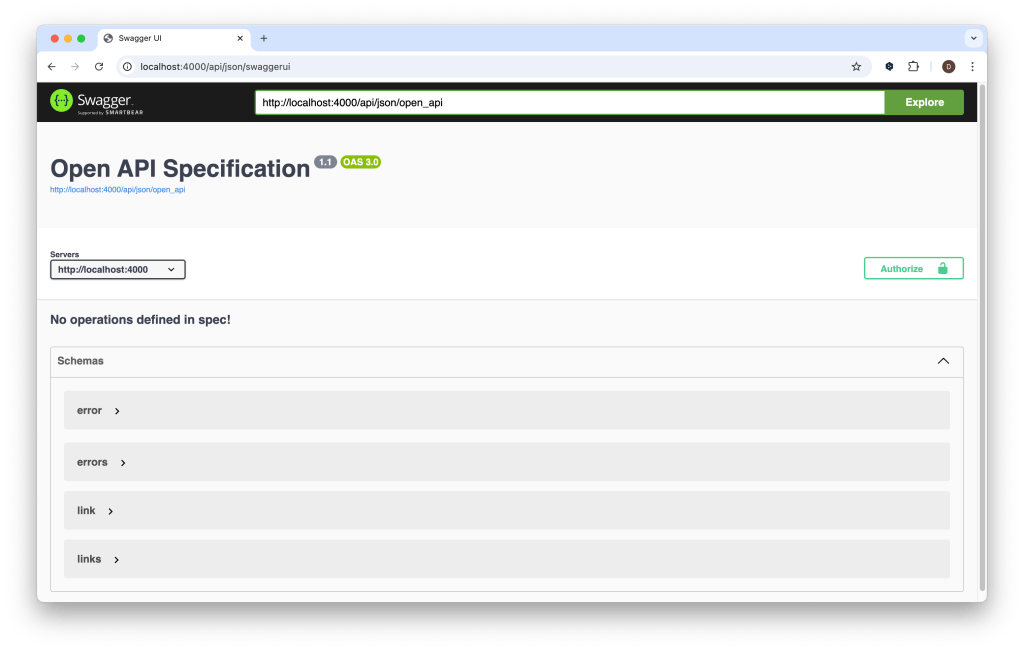
위 명령어를 실행하면 단계적으로 사용자의 확인을 받아가며 AshJsonApi 가 설치 된다. 모두 Y 를 선택해 설치를 완료한 다. 이후 오류 없이 phoenix 서버를 실행 된다면 준비가 완료된 것이다. Swagger UI 가 제공되므로 바로 확인할 수 있다. API 의 기본 경로는 /api/json 이고 Swagger UI 의 경로는 /api/json/swaggerui 이다.

% mix phx.server

# 이후 브라우저에서 http://localhost:4000/api/json/swaggerui 호출
설치 즉시 제공되는 Swagger UI 화면

이제 도메인과 리소스에 익스텐션 설정을 추가하자. 다음 명령어를 실행하면 Ticket 리소스에 익스텐션 설정을 추가할 수 있다. 다른 리소스에 추가하려면 리소스 이름을 변경한다.

% mix ash.patch.extend Helpdesk.Support.Ticket json_api
# 도메인에 다음과 같이 익스텐션 설정이 추가된다
defmodule Helpdesk.Support do
  use Ash.Domain, extensions: [AshJsonApi.Domain]
  ...

# 지정한 리소스에는 다음과 같이 설정이 추가된다.
defmodule Helpdesk.Support.Ticket do
  use Ash.Resource, extensions: [AshJsonApi.Resource]
  # ...
  json_api do
    type "ticket"
  end
end

다음은 해당 리소스에 접근하기 위한 라우트 설정이 필요하다. API 주소를 설정하는 것으로 이해하면 되겠다. 라우트 설정은 도메인 또는 리소스에 선언할 수 있는데 도메인에 설정되는 것이 권장되는 것 같다. 도메인 코드에 라우트 선언을 추가하자.

defmodule Helpdesk.Support do
  use Ash.Domain, extensions: [AshJsonApi.Domain]

  # 추가하는 부분
  json_api do
    routes do
      base_route "/tickets", Helpdesk.Support.Ticket do
        get :read
        index :read
        post :open
      end
    end
  end
  
  ...
end

base_route 는 일종의 스코프처럼 동작하며 해당 리소스의 기본 주소로 사용된다. get 은 단일 리소스 획득, index 는 리소스 목록 획득, post 는 리소스를 만드는 역할을 한다. 뒤에 따라오는 atom 은 리소스의 action 이름이다. action type 과 route type 이 맞지 않으면 에러가 발생한다(예: get :open, post :read 등). routes 에서 사용할 수 있는 route type 의 예시는 다음과 같다.

routes do
  base "/posts"

  get :read
  get :me, route: "/me"
  index :read
  post :confirm_name, route: "/confirm_name"
  patch :update
  related :comments, :read
  relationship :comments, :read
  post_to_relationship :comments
  patch_relationship :comments
  delete_from_relationship :comments
end

도메인에 API 라우트 선언을 추가하고 나서 서버를 재 실행한 뒤 /api/json/swaggerui 를 다시 열어보면 선언한 API 가 문서로 만들어 진 것을 확인할 수 있다.

Swagger UI 에 추가된 API 문서

Swagger UI 에서 직접 테스트를 해 볼 수도 있고 브라우저 및 curl 로도 테스트 해 볼 수 있다.

% curl -X POST 'localhost:4000/api/json/tickets' \
--header 'Accept: application/vnd.api+json' \
--header 'Content-Type: application/vnd.api+json' \
--data-raw '{
  "data": {
    "type": "ticket",
    "attributes": {
      "subject": "This ticket was created through the JSON API"
    }
  }
}'  

% curl 'localhost:4000/api/json/tickets'

% curl 'localhost:4000/api/json/tickets/<uuid>' // uuid 는 조회할 ticket 의 uuid

목록 또는 단일 레코드를 조회 해 보면 데이터 수나 id 값은 표시되는데 레코드의 값은 표시되지 않을 수 있다.

{
  "data": [
    {
      "attributes": {},
      "id": "1731818f-e40f-4376-9356-292e17243d05",
      "links": {},
      "meta": {},
      "type": "ticket",
      "relationships": {}
    },
    {
      "attributes": {},
      "id": "310143d0-3c3a-4507-9ea4-6f84d2ba5122",
      "links": {},
      "meta": {},
      "type": "ticket",
      "relationships": {}
    },
    ...
  ]
}

이 때는 리소스의 attribute 별 public? 설정을 true 로 바꿔주면 해당 attribute 의 값이 표시된다.

defmodule Helpdesk.Support.Ticket do
  ...

  attributes do
    uuid_primary_key :id

    attribute :subject, :string do
      allow_nil? false
      public? true  # 추가
    end

    attribute :status, :atom do
      constraints one_of: [:open, :closed]
      public? true
      default :open
      allow_nil? false  # 추가
    end
  end

  ...
end
{
  "data": [
    {
      "attributes": {
        "status": "open",
        "subject": "Issue 3"
      },
      "id": "1731818f-e40f-4376-9356-292e17243d05",
      "links": {},
      "meta": {},
      "type": "ticket",
      "relationships": {}
    },
    {
      "attributes": {
        "status": "closed",
        "subject": "Issue 4"
      },
      "id": "310143d0-3c3a-4507-9ea4-6f84d2ba5122",
      "links": {},
      "meta": {},
      "type": "ticket",
      "relationships": {}
    },
  ...
}

AshJsonApi 익스텐션을 통해 비교적 손쉽게 리소스에 REST API 를 붙일 수 있었다. 내부 리소스를 외부에 직접 노출하는 것에 대한 이견은 있을 수 있지만 만약 여러가지 이유로 인해 내부 리소스를 바로 외부에 노출하기로 결정했다면 매우 유용한 도구가 될 것 같다. Swagger 형태의 API 문서가 같이 제공되는 점도 큰 장점이라 할 수 있겠다.

AshPostgres 사용해 보기 (2)

지난 글에 이어서 AshPostgres 튜토리얼을 따라가며 사용법을 배워 본다. 이번 글 에서는 집계(Aggregates)와 계산(Calculations)에 대해 알아 볼 것이다.

집계(Aggregates)

집계(Aggregates)는 관계로 연결된 데이터들을 모아 요약 정보를 제공하는 도구이다. 관계로 연결된 데이터들의 합계, 수, 최대값, 최소값, 평균값 등 통계성 값 들을 얻는데 사용한다. 예제에선 Representative 와 Ticket 이 일대다 관계로 연결되었기 때문에 담당자가 몇개의 티켓을 가지고 있는지 진행중인 티켓은 몇 개 인지 같은 값을 얻는데 사용할 수 있다.

다음 코드를 담당자 리소스 선언에 추가한다.

# in lib/helpdesk/support/representative.ex

  aggregates do
    # 첫번째 인자는 집계의 이름, 두 번째 인자는 관계의 이름
    count :total_tickets, :tickets

    count :open_tickets, :tickets do
      # 표현식으로 필터링 할 수 도 있다
      filter expr(status == :open)
    end

    count :closed_tickets, :tickets do
      filter expr(status == :closed)
    end
  end
# in iex

iex> require Ash.Query

iex> Helpdesk.Support.Representative
|> Ash.Query.filter(closed_tickets < 4)  # closed_tickets 집계가 사용 됨
|> Ash.Query.sort(closed_tickets: :desc) # closed_tickets 집계가 사용 됨
|> Ash.read!()

18:44:34.441 [debug] QUERY OK source="representatives" db=15.7ms queue=0.1ms idle=1406.0ms
SELECT r0."id", r0."name" FROM "representatives" AS r0 LEFT OUTER JOIN LATERAL (SELECT st0."representative_id" AS "representative_id", coalesce(count(*), $1::bigint)::bigint AS "closed_tickets" FROM "public"."tickets" AS st0 WHERE (r0."id" = st0."representative_id") AND (st0."status"::varchar = $2::varchar) GROUP BY st0."representative_id") AS s1 ON TRUE WHERE (coalesce(s1."closed_tickets", $3::bigint)::bigint < $4::bigint) ORDER BY coalesce(s1."closed_tickets", $5::bigint)::bigint DESC [0, :closed, 0, 4, 0]

# 저장된 데이터 상황에 따라 결과는 달라질 수 있음
[
  %Helpdesk.Support.Representative{
    id: "f773d41f-24f8-4d38-a5ef-a98a187de034",
    name: "Joe Armstrong",
    total_tickets: #Ash.NotLoaded<:aggregate, field: :total_tickets>,
    open_tickets: #Ash.NotLoaded<:aggregate, field: :open_tickets>,
    closed_tickets: #Ash.NotLoaded<:aggregate, field: :closed_tickets>,
    tickets: #Ash.NotLoaded<:relationship, field: :tickets>,
    __meta__: #Ecto.Schema.Metadata<:loaded, "representatives">
  },
  %Helpdesk.Support.Representative{
    id: "a4467ac7-6f4e-49b1-bdea-9dc98acb5ac9",
    name: "Test User 2",
    total_tickets: #Ash.NotLoaded<:aggregate, field: :total_tickets>,
    open_tickets: #Ash.NotLoaded<:aggregate, field: :open_tickets>,
    closed_tickets: #Ash.NotLoaded<:aggregate, field: :closed_tickets>,
    tickets: #Ash.NotLoaded<:relationship, field: :tickets>,
    __meta__: #Ecto.Schema.Metadata<:loaded, "representatives">
  }
]

리소스에 total_tickets, open_tickets, closed_tickets 값이 추가된 것을 확인할 수 있다. 기본적으로 명시적 로드를 해야만 쿼리에도 반영되고 값도 획득된다. closed_tickets 값은 필터링에서 사용되었기 때문에 쿼리에 집계가 포함되었으나 해당 값 자체는 로드하지 않았기 때문에 NotLoaded 이다. 명시적으로 값을 로드하는 코드는 다음과 같다.

iex> Helpdesk.Support.Representative 
   |> Ash.Query.filter(closed_tickets < 4) 
   |> Ash.Query.sort(closed_tickets: :desc) 
   |> Ash.Query.load([:closed_tickets, :open_tickets, :total_tickets]) # 명시
   |> Ash.read!()

계산(Calculations)

계산은 집계와 비슷하지만 개별 레코드에 대해 작동한다는 것이 다르다. 그러나 계산은 집계된 값을 참조할 수 있다. 예를들어 할당된 티켓의 상태 비율을 계산하는 코드는 다음과 같이 만들 수 있다.

# in lib/helpdesk/support/representative.ex

  calculations do
    # open_tickets, total_tickets 는 aggregates 값
    calculate :percent_open, :float, expr(open_tickets / total_tickets)
  end

iex> Helpdesk.Support.Representative
|> Ash.Query.filter(percent_open > 0.25)
|> Ash.Query.sort(:percent_open)
|> Ash.Query.load(:percent_open)
|> Ash.read!()


19:00:02.609 [debug] QUERY OK source="representatives" db=4.2ms queue=18.6ms idle=1420.5ms
SELECT r0."id", r0."name", (coalesce(s1."open_tickets", $1::bigint)::bigint::decimal / coalesce(s1."total_tickets", $2::bigint)::bigint::decimal)::float FROM "representatives" AS r0 LEFT OUTER JOIN LATERAL (SELECT st0."representative_id" AS "representative_id", coalesce(count(*) FILTER (WHERE st0."status"::varchar = $3::varchar), $4::bigint)::bigint AS "open_tickets", coalesce(count(*) FILTER (WHERE $5), $6::bigint)::bigint AS "total_tickets" FROM "public"."tickets" AS st0 WHERE (r0."id" = st0."representative_id") GROUP BY st0."representative_id") AS s1 ON TRUE WHERE ((coalesce(s1."open_tickets", $7::bigint)::bigint::decimal / coalesce(s1."total_tickets", $8::bigint)::bigint::decimal)::float > $9::float) ORDER BY (coalesce(s1."open_tickets", $10::bigint)::bigint::decimal / coalesce(s1."total_tickets", $11::bigint)::bigint::decimal)::float [0, 0, :open, 0, true, 0, 0, 0, 0.25, 0, 0]
[
  %Helpdesk.Support.Representative{
    id: "f773d41f-24f8-4d38-a5ef-a98a187de034",
    name: "Joe Armstrong",
    total_tickets: #Ash.NotLoaded<:aggregate, field: :total_tickets>,
    open_tickets: #Ash.NotLoaded<:aggregate, field: :open_tickets>,
    closed_tickets: #Ash.NotLoaded<:aggregate, field: :closed_tickets>,
    percent_open: 0.5,
    tickets: #Ash.NotLoaded<:relationship, field: :tickets>,
    __meta__: #Ecto.Schema.Metadata<:loaded, "representatives">
  },
  %Helpdesk.Support.Representative{
    id: "a4467ac7-6f4e-49b1-bdea-9dc98acb5ac9",
    name: "Test User 2",
    total_tickets: #Ash.NotLoaded<:aggregate, field: :total_tickets>,
    open_tickets: #Ash.NotLoaded<:aggregate, field: :open_tickets>,
    closed_tickets: #Ash.NotLoaded<:aggregate, field: :closed_tickets>,
    percent_open: 0.5,
    tickets: #Ash.NotLoaded<:relationship, field: :tickets>,
    __meta__: #Ecto.Schema.Metadata<:loaded, "representatives">
  }
]

집계과 계산을 잘 활용하면 리소스 별 통계성 값 들을 꽤 깔끔하게 코드로 표현할 수 있다. 예제의 코드들은 Ash 가 만들어 주는 쿼리들 이었지만 원한다면 직접 커스텀 집계 쿼리를 만들 수 도 있다. 적절히 사용하면 리소스의 명료한 표현에 큰 도움이 될 것 같다.

AshPostgres 사용해 보기

Ash는 도메인을 중심으로 리소스를 정의하면 API, 데이터 레이어 등의 구현을 자동으로 생성해주는 Elixir의 선언적 백엔드 프레임워크이다. 리소스를 다루다 보면 리소스의 상태를 데이터베이스에 저장할 필요가 있는데 이 때 AshPostgres 익스텐션을 사용할 수 있다. 이름에서 알 수 있듯 PostgreSQL 데이터베이스에 리소스의 상태를 저장하는 기능을 제공한다. 이번 글 에서는 AshPostgres의 튜토리얼을 따라가며 어떻게 사용하는지 살펴본다.

이 글의 예제 코드는 https://hexdocs.pm/ash/get-started.html 에서 만든 코드부터 시작하기 때문에 코드를 이어서 실행하기 위해선 위의 Ash 튜토리얼을 먼저 진행해 보는 것을 권장한다.

설치 및 설정

리소스를 Postgres 데이터베이스에 저장 하는 익스텐션이니 당연히 먼저 Postgres 데이터베이스 가 설치되어 있어야 한다.

Igniter 를 가지고 AshPostgres 설치(설정) 한다. 공식 문서에는 수동으로 직접 설정하는 방법도 있지만 추가해야 할 부분이 많아 다음 mix 명령어를 통해 쉽게 설정하는 것을 권장한다.

$ mix igniter.install ash_postgres

AshPostgres 관련 기본 설정들이 추가되고 postgres 접속 정보도 config/ 에 추가 된다. 접속 정보는 설치된 postgres 상황에 맞게 변경한다.

# in config/dev.exs

import Config

# Configure your database
config :helpdesk, Helpdesk.Repo,
  username: "postgres",
  password: "postgres",
  hostname: "localhost",
  database: "helpdesk_dev",
  port: 5432,
  show_sensitive_data_on_connection_error: true,
  pool_size: 10

다음은 리소스의 Data Layer 를 AshPostgres 로 변경한다. 다음 mix 명령어를 통해 쉽게 변경할 수도 있고 직접 리소스의 코드를 변경해도 된다.

$ mix ash.patch.extend Helpdesk.Support.Ticket postgres
$ mix ash.patch.extend Helpdesk.Support.Representative postgres

실제 코드는 다음과 같이 바뀐다.

# in lib/helpdesk/support/ticket.ex

  use Ash.Resource,
    domain: Helpdesk.Support,
    data_layer: AshPostgres.DataLayer

  postgres do
    table "tickets"
    repo Helpdesk.Repo
  end

# in lib/helpdesk/support/representative.ex

  use Ash.Resource,
    domain: Helpdesk.Support,
    data_layer: AshPostgres.DataLayer

  postgres do
    table "representatives"
    repo Helpdesk.Repo
  end

postgres 키워드와 함께 table 을 지정할 수 있다.

마이그레이션

다음은 마이그레이션을 생성한다. 마이그레이션은 실제로 데이터베이스의 변경을 가하는 일종의 스크립트이다. 다음 mix 명령어를 실행한다. add_tickets_and_representatives 부분은 이번 마이그레이션이 어떤 일을 수행하는지 적당한 이름을 지어주면 된다.

$ mix ash.codegen add_tickets_and_representatives

리소스에 postgres 등 AshPostgres 관련 선언이 추가되었기 때문에 리소스가 변경된 이력을 바탕으로 마이그레이션 코드를 자동으로 만들어 준다. Ash 를 사용하지 않는다면 이런 데이터베이스 변경 건에 대해 마이그레이션 스크립트를 직접 만들어야 하는 수고가 있는데 Ash Codegen 기능이 이러한 수고를 덜어 준다. priv/repo/migrations 폴더에 마이그레이션 관련 스크립트가 만들어 진다.

자동으로 만들어진 마이그레이션은 다음과 같다. Ecto.Migration 기반이고 up 메소드가 실행 스크립트, down 메소드가 롤백 스크립트이다.

defmodule Helpdesk.Repo.Migrations.AddTicketsAndRepresentatives do
  @moduledoc """
  Updates resources based on their most recent snapshots.

  This file was autogenerated with `mix ash_postgres.generate_migrations`
  """

  use Ecto.Migration

  def up do
    create table(:tickets, primary_key: false) do
      add(:id, :uuid, null: false, default: fragment("gen_random_uuid()"), primary_key: true)
      add(:subject, :text, null: false)
      add(:status, :text, null: false, default: "open")
      add(:representative_id, :uuid)
    end

    create table(:representatives, primary_key: false) do
      add(:id, :uuid, null: false, default: fragment("gen_random_uuid()"), primary_key: true)
    end

    alter table(:tickets) do
      modify(
        :representative_id,
        references(:representatives,
          column: :id,
          name: "tickets_representative_id_fkey",
          type: :uuid,
          prefix: "public"
        )
      )
    end

    alter table(:representatives) do
      add(:name, :text)
    end
  end

  def down do
    alter table(:representatives) do
      remove(:name)
    end

    drop(constraint(:tickets, "tickets_representative_id_fkey"))

    alter table(:tickets) do
      modify(:representative_id, :uuid)
    end

    drop(table(:representatives))

    drop(table(:tickets))
  end
end

Ecto 와는 다르게 snapshot 파일이 만들어 지는데 이는 마이그레이션 시점의 리소스 메타데이터를 JSON 형태로 저장하는 것으로 보인다. 리소스 선언이 변경될 때 resource_snapshot 과 비교해 자동으로 마이그레이션을 생성하기 위한 것으로 보인다.

여기까지 마이그레이션을 만들었다면 만들어진 마이그레이션을 실제로 수행하는 명령어는 다음과 같다.

$ mix ash.setup

Getting extensions in current project...
Running setup for AshPostgres.DataLayer...
The database for Helpdesk.Repo has already been created

17:52:39.685 [info] == Running 20250903084048 Helpdesk.Repo.Migrations.AddTicketsAndRepresentatives.up/0 forward

17:52:39.687 [info] create table tickets

17:52:39.706 [info] create table representatives

17:52:39.708 [info] alter table tickets

17:52:39.714 [info] alter table representatives

17:52:39.720 [info] == Migrated 20250903084048 in 0.0s

실행하면 실제로 SQL 쿼리 로그가 찍히면서 관련 테이블이 만들어 지는 것을 확인할 수 있을 것이다.

이제 몇 가지 테스트 코드를 실행해서 실제로 데이터베이스에 리소스의 상태가 저장되는지 확인해 보자. 아래 코드는 모두 iex 세션에서 실행한다.

iex> require Ash.Query

iex> representative = (
  Helpdesk.Support.Representative
  |> Ash.Changeset.for_create(:create, %{name: "Joe Armstrong"})
  |> Ash.create!()
)

iex> for i <- 0..5 do
  ticket =
    Helpdesk.Support.Ticket
    |> Ash.Changeset.for_create(:open, %{subject: "Issue #{i}"})
    |> Ash.create!()
    |> Ash.Changeset.for_update(:assign, %{representative_id: representative.id})
    |> Ash.update!()

  if rem(i, 2) == 0 do
    ticket
    |> Ash.Changeset.for_update(:close)
    |> Ash.update!()
  end
end


# Show the tickets where the subject contains "2"
iex> Helpdesk.Support.Ticket
|> Ash.Query.filter(contains(subject, "2"))
|> Ash.read!()

# Show the tickets that are closed and their subject does not contain "4"
iex> Helpdesk.Support.Ticket
|> Ash.Query.filter(status == :closed and not(contains(subject, "4")))
|> Ash.read!()

Ash 튜토리얼에서 테스트로 사용했던 코드와 완전히 일치 한다. 리소스를 다루는 코드는 그대로이지만 리소스 선언 상 data_layer 가 AshPosgres 로 변경되었기 때문에 리소스는 ETS(메모리)가 아닌 Postgres 데이터베이스에 저장 되는 것을 확인할 수 있다. 실제로 실행 결과에서도 중간중간 쿼리가 만들어 진 것을 확인할 수 있다.

여기까지 AshPostgres 를 Ash 가 적용된 프로젝트에 처음 추가하는 방법을 살펴 봤다. 다음 글 에서는 관련 데이터 그룹에 대한 요약 정보를 제공하는 집계와 계산 함수에 대해 알아보겠다.

Ash Framework 튜토리얼 따라하기 (6)

계속해서 Ash Framework 에서 리소스간 관계를 설정하고 다루는 방법에 대해 알아 본다.

새 리소스를 만든다. Representative 로 담당자 정보에 대한 리소스이다. 티켓은 한 담당자에 속해 있을 수 있고 한 담당자는 여러 개의 티켓을 가질 수 있다. 1 (담당자) : 다 (티켓) 구조 이다. 먼저 담당자 리소스를 추가로 선언한다.

# lib/helpdesk/support/representative.ex

defmodule Helpdesk.Support.Representative do
  use Ash.Resource,
    domain: Helpdesk.Support,
    data_layer: Ash.DataLayer.Ets

  actions do
    defaults [:read]

    create :create do
      accept [:name]
    end
  end

  attributes do
    uuid_primary_key :id

    attribute :name, :string do
      public? true
    end
  end

  relationships do
    has_many :tickets, Helpdesk.Support.Ticket
  end
end

다른 선언은 Ticket 예제와 크게 다르지 않다. relationships 선언이 추가되었다. has_many 를 선언함으로 이 리소스는 여러개의 Ticket 을 가질 수 있음을 선언한다. 일대다 관계에서는 두 리소스를 연결할 기준 필드가 필요한데 Ash 에서는 source_attribute, destination_attribute 라 부른다. 기본적으로 source_attribute:id로 가정되며, destination_attribute<모듈명의_마지막_부분을_스네이크케이스로_변환>_id 형태로 기본값이 설정된다. 예제 코드에서는 source_attribute -> :id, destination_attribute -> :representative_id 인 것이다.

Ticket 에는 Ticket이 Representative 에 속한다는 것을 선언 한다. Ticket 에도 relationships 를 추가 한다.

# lib/helpdesk/support/ticket.ex

relationships do
  belongs_to :representative, Helpdesk.Support.Representative
end

belongs_to 도 has_many 와 마찬가지로 source_attribute, destination_attribute 가 있다. 기본 값 규칙은 다음과 같다.

belongs_to :owner, MyApp.User do
  # 기본값 :<relationship_name>_id (i.e. :owner_id)
  source_attribute :custom_attribute_name # 직접 설정할 수 도 있다

  # 기본값 :id
  destination_attribute :custom_attribute_name # 직접 설정할 수 도 있다
end

예제 코드는 관계명을 :representative 로 하였으므로 source_attribute 는 :representative_id destination_attribute 는 :id 가 된다.

마지막으로 추가된 Representative 리소스를 Support 도메인에 추가 한다.

# lib/helpdesk/support.ex

resources do
 ...
 resource Helpdesk.Support.Representative
end

Representative 가 Support 도메인의 리소스로 등록되고 Representative 와 Ticket 은 일대다 관계가 설정되었다. 관계가 제대로 설정되었는지 어떻게 다루는지 코드로 확인해 보자.

Representative 와 Ticket 이 관계를 맺는 것은 티켓에 담당자를 할당하는 액션과 같다. Ticket 에 :assign 액션을 추가 하자.

# lib/helpdesk/support/ticket.ex

actions do
  ...
  update :assign do
    accept [:representative_id]
  end
end

이제 코드를 통해 관계를 설정하고 조회하면서 어떻게 동작하는지 확인해 보자.

iex> ticket = (
  Helpdesk.Support.Ticket
  |> Ash.Changeset.for_create(:open, %{subject: "I can't find my hand!"})
  |> Ash.create!()
)

%Helpdesk.Support.Ticket{
  id: "5f8e4bf2-851b-4d42-af02-77e90848afa7",
  subject: "I can't find my hand!",
  status: :open,
  representative_id: nil,
  representative: #Ash.NotLoaded<:relationship, field: :representative>,
  __meta__: #Ecto.Schema.Metadata<:loaded>
}

Ticket 리소스를 만들었다. representative_id 필드가 있고 nil 인 것을 확인할 수 있다.

iex> ticket2 = (
  Helpdesk.Support.Ticket
  |> Ash.Changeset.for_create(:open, %{subject: "Please fix it."})
  |> Ash.create!()
)

%Helpdesk.Support.Ticket{
  id: "442d09a4-f13d-47bf-9bce-1ab5db148696",
  subject: "Please fix it.",
  status: :open,
  representative_id: nil,
  representative: #Ash.NotLoaded<:relationship, field: :representative>,
  __meta__: #Ecto.Schema.Metadata<:loaded>
}

또 다른 Ticket 리소스. 한 담당자에게 두 개의 티켓을 할당 할 것이다.

iex> representative = (
  Helpdesk.Support.Representative
  |> Ash.Changeset.for_create(:create, %{name: "Joe Armstrong"})
  |> Ash.create!()
)

%Helpdesk.Support.Representative{
  id: "16209c46-5df7-4aa7-9ec7-2b599d786f96",
  name: "Joe Armstrong",
  tickets: #Ash.NotLoaded<:relationship, field: :tickets>,
  __meta__: #Ecto.Schema.Metadata<:loaded>
}

Representative 리소스. tickets 필드가 있고 지연로드 때문에 데이터가 보이지 않는다. 지금 시점에선 로드한다 하더라도 티켓을 할당하지 않았기 때문에 빈 리스트 일 것이다.

iex> ticket
|> Ash.Changeset.for_update(:assign, %{representative_id: representative.id})
|> Ash.update!()

%Helpdesk.Support.Ticket{
  id: "5f8e4bf2-851b-4d42-af02-77e90848afa7",
  subject: "I can't find my hand!",
  status: :open,
  representative_id: "16209c46-5df7-4aa7-9ec7-2b599d786f96",
  representative: #Ash.NotLoaded<:relationship, field: :representative>,
  __meta__: #Ecto.Schema.Metadata<:loaded>
}

iex> ticket2
|> Ash.Changeset.for_update(:assign, %{representative_id: representative.id})
|> Ash.update!()

%Helpdesk.Support.Ticket{
  id: "442d09a4-f13d-47bf-9bce-1ab5db148696",
  subject: "Please fix it.",
  status: :open,
  representative_id: "16209c46-5df7-4aa7-9ec7-2b599d786f96",
  representative: #Ash.NotLoaded<:relationship, field: :representative>,
  __meta__: #Ecto.Schema.Metadata<:loaded>
}

두 티켓 리소스에 같은 담당자를 할당 했다. 둘 다 같은 representative_id 가 할당 된 것을 확인할 수 있다.

iex> Helpdesk.Support.Representative |> Ash.Query.load(:tickets) |> Ash.read_one!()

%Helpdesk.Support.Representative{
  id: "16209c46-5df7-4aa7-9ec7-2b599d786f96",
  name: "Joe Armstrong",
  tickets: [
    %Helpdesk.Support.Ticket{
      id: "442d09a4-f13d-47bf-9bce-1ab5db148696",
      subject: "Please fix it.",
      status: :open,
      representative_id: "16209c46-5df7-4aa7-9ec7-2b599d786f96",
      representative: #Ash.NotLoaded<:relationship, field: :representative>,
      __meta__: #Ecto.Schema.Metadata<:loaded>
    },
    %Helpdesk.Support.Ticket{
      id: "5f8e4bf2-851b-4d42-af02-77e90848afa7",
      subject: "I can't find my hand!",
      status: :open,
      representative_id: "16209c46-5df7-4aa7-9ec7-2b599d786f96",
      representative: #Ash.NotLoaded<:relationship, field: :representative>,
      __meta__: #Ecto.Schema.Metadata<:loaded>
    }
  ],
  __meta__: #Ecto.Schema.Metadata<:loaded>
}

Representative 를 그냥 로드하면 relationships 필드는 즉시 로딩되지 않는다. 명시적으로 해당 필드를 로드(Ash.Query.load(:tickets))해야 데이터를 가져오게 된다. 담당자 데이터에 할당 된 티켓 목록을 확인할 수 있다.

공식 튜토리얼의 예제는 여기까지지만 지금까지의 내용은 정말 기초에 불과하고 살펴봐야 할 내용과 기능이 많은 것 같다. 앞으로 계속 살펴보고 배워두면 Elixir/Phoenix 환경에서의 개발에 도움이 많이 될 것 같다.

Ash Framework 튜토리얼 따라하기 (5)

지난 글에 이어 Ash Framework 에서 영속성에 대해 다루는 방법을 알아 본다.

지난 글 에서도 잠깐 언급이 있었지만 리소스에 data_layer 를 추가하면 해당 레이어에 데이터가 저장 된다. 예제에서는 ETS 를 data layer 로 사용 한다. ETS 는 Erlang/Elixir 환경의 인메모리 데이터베이스이다. Ticket 리소스에 다음 코드를 추가 한다.

# lib/helpdesk/support/ticket.ex

use Ash.Resource,
  domain: Helpdesk.Support,
  data_layer: Ash.DataLayer.Ets

Ash 에서 어떤 데이터 레이어를 지원하는지 궁금할 수 있다. Ash 에서는 데이터 레이어를 익스텐션 형태로 제공하는데 기본으로 제공하는 것은 ETS, Mnesia, Simple 이 정도 인 것 같고 다른 것은 추가로 익스텐션을 설치해야 하는 것 같다. 대표적인 익스텐션으로 AshPostgres 가 있다.

데이터 레이어를 추가하고 다음 코드를 다시 실행해 보자. 이전 글 과는 달리 리소스에서 데이터 레이어를 지정했기 때문에 따로 set_data 를 통해 데이터를 제공하지 않아도 된다.


require Ash.Query

for i <- 0..5 do
  ticket =
    Helpdesk.Support.Ticket
    |> Ash.Changeset.for_create(:open, %{subject: "Issue #{i}"})
    |> Ash.create!()

  if rem(i, 2) == 0 do
    ticket
    |> Ash.Changeset.for_update(:close)
    |> Ash.update!()
  end
end

# 제목에 "2"를 포함한 티켓
Helpdesk.Support.Ticket
|> Ash.Query.filter(contains(subject, "2"))
|> Ash.read!()

# :closed 이면서 제목에 "4"를 포함하지 않은 티켓
Helpdesk.Support.Ticket
|> Ash.Query.filter(status == :closed and not(contains(subject, "4")))
|> Ash.read!()

비교적 쉽게 리소스를 데이터 레이어에 저장할 수 있게 되었다. 그러나 데이터 레이어는 보통 외부 데이터 저장소를 사용하고 저장소마다 특성이 있기 때문에 그에 맞는 익스텐션 사용법을 추가로 확인해야 할 것 같다. 범용 데이터베이스인 PostgreSQL 의 익스텐션이 있긴 하나 MySQL 익스텐션은 현 시점 아직 알파 버전 이다. 감안하고 사용해야 할 것 같다.

다음 글 에서는 리소스 간 관계 설정에 대해 알아 보겠다.

Ash Framework 튜토리얼 따라하기 (4)

지난 글에 이어서 Ash 프레임워크에서 데이터를 쿼리하는 방법을 알아본다.

먼저 Ticket 리소스 전체 목록을 가져오는 코드는 다음과 같다.

Ash.read!(Helpdesk.Support.Ticket)

그러나 지금 상황에서 코드를 바로 실행하면 다음과 같은 오류가 발생한다.

iex> Ash.read!(Helpdesk.Support.Ticket)
** (Ash.Error.Framework) 
Bread Crumbs:
  > Error returned from: Helpdesk.Support.Ticket.read

Framework Error

* No data provided to resource Elixir.Helpdesk.Support.Ticket. Perhaps you are missing a call to `Ash.DataLayer.Simple.set_data/2`?.

Another common cause of this is failing to add a data layer for a resource. You can add a data layer like so:

`use Ash.Resource, data_layer: Ash.DataLayer.Ets`

Ticket 리소스에 대해 데이터 레이어가 없다는 얘기다. 지금까지 리소스를 정의만 했지 어디에 저장할지는 정의하지 않았다. 리소스를 어디에 저장할 지 데이터 레이어를 지정하면 해결되지만 그 전에 데이터 레이어가 없는 경우에는 어떻게 다룰 수 있는지 알아 보자.

데이터 레이어가 없는 리소스는 암시적으로 Ash.DataLayer.Simple 를 사용한다. 이 데이터는 어디에도 영속화 되지 않으며 쿼리가 실행될 때 같이 제공되어야 한다.

조회를 시험해 볼 데이터를 먼저 만든다.

iex> tickets =
  for i <- 0..5 do
    ticket =
      Helpdesk.Support.Ticket
      |> Ash.Changeset.for_create(:open, %{subject: "Issue #{i}"})
      |> Ash.create!()

    if rem(i, 2) == 0 do
      ticket
      |> Ash.Changeset.for_update(:close)
      |> Ash.update!()
    else
      ticket
    end
  end

[
  %Helpdesk.Support.Ticket{
    id: "d2c428d4-d3c6-474a-a353-3ecdaeef3080",
    subject: "Issue 0",
    status: :closed,
    __meta__: #Ecto.Schema.Metadata<:built, "">
  },
  %Helpdesk.Support.Ticket{
    id: "34844252-aeeb-4c4f-9d1b-9526f9ac9813",
    subject: "Issue 1",
    status: :open,
    __meta__: #Ecto.Schema.Metadata<:built, "">
  },
  %Helpdesk.Support.Ticket{
    id: "4dd6b7b4-a3c5-4630-b26f-d85550b53858",
    subject: "Issue 2",
    status: :closed,
    __meta__: #Ecto.Schema.Metadata<:built, "">
  },
  %Helpdesk.Support.Ticket{
    id: "6def5674-8504-4062-a1d6-b5cc1c2c1b06",
    subject: "Issue 3",
    status: :open,
    __meta__: #Ecto.Schema.Metadata<:built, "">
  },
  %Helpdesk.Support.Ticket{
    id: "edc86cc1-0455-41ab-8f6e-2d3b00351bb5",
    subject: "Issue 4",
    status: :closed,
    __meta__: #Ecto.Schema.Metadata<:built, "">
  },
  %Helpdesk.Support.Ticket{
    id: "e537457b-59fa-4d41-bf6f-54ac019ed76c",
    subject: "Issue 5",
    status: :open,
    __meta__: #Ecto.Schema.Metadata<:built, "">
  }
]

tickets 에 임의의 리소스 목록이 만들어 졌다. 영속화 되지 않은 데이터이다. 이 데이터를 Ash 를 통해 조회하려면 어떻게 할 수 있는지 알아 보자. 제목에 “2” 를 포함한 리소스만 읽는 쿼리는 다음과 같다.


# Ash.Query는 매크로이므로 require 해야 함
iex> require Ash.Query 

Ash.Query

iex> Helpdesk.Support.Ticket |> Ash.Query.filter(contains(subject, "2")) |> Ash.DataLayer.Simple.set_data(tickets) |> Ash.read!()

[
  %Helpdesk.Support.Ticket{
    id: "4dd6b7b4-a3c5-4630-b26f-d85550b53858",
    subject: "Issue 2",
    status: :closed,
    __meta__: #Ecto.Schema.Metadata<:built, "">
  }
]

Ash.read!() 전에 Ash.DataLayer.Simple.set_data(tickets) 를 통해 파이프라인에 tickets 데이터를 제공한 것을 확인할 수 있다. Ash.Query.filter(contains(subject, "2")) 는 일종의 where 절 이라고 볼 수 있다. 예제 코드의 순서는 read 직전에 set_data 를 지정했지만 set_data 부터 하고 이후에 filter 를 해도 결과는 같았다.

다음은 :closed 티켓 중 제목에 “4” 가 포함되지 않은 티켓의 목록을 얻는 코드이다.

Helpdesk.Support.Ticket
|> Ash.Query.filter(status == :closed and not(contains(subject, "4")))
|> Ash.DataLayer.Simple.set_data(tickets)
|> Ash.read!()

다음 글 에서는 데이터 영속화에 대해 알아 본다.

Ash Framework 튜토리얼 따라하기 (3)

https://hexdocs.pm/ash/get-started.html 를 따라가며 Ash 프레임워크를 살펴 본다. 이전 글에 이어서 Ticket 리소스를 업데이트 하는 방법을 알아 본다.

Ticket 을 종료하는 기능이 필요하다. 티켓이 가지고 있는 status 를 :closed 로 바꾸면 된다. 이미 :closed status 인 경우 값을 변경하지 않고 적절한 에러 메시지를 안내한다.

Ticket 리소스에서 다음과 같이 선언을 변경한다.

# lib/helpdesk/support/ticket.ex

actions do
  ...
  update :close do
    accept []

    validate attribute_does_not_equal(:status, :closed) do
      message "Ticket is already closed"
    end

    change set_attribute(:status, :closed)
  end
end

액션의 형태는 update 이고 이름은 :close 이다. 파라미터가 필요하다면 accept 를 줄 수 있다. 이 예제는 티켓을 종료할 때 특별히 전달 받을 데이터가 없으므로 빈 리스트로 지정한다.

validate 는 값의 유효성을 검사하기 위해 사용한다. 그대로 읽어 보자면 :status attribute_does_not_equal :closed -> :status 속성은 :closed 가 아니어야 한다 로 읽을 수 있을 것 같다. 따라오는 do ~ end 는 이 조건에 해당하지 않으면(즉, invalidate 하다면) 처리할 내용이다. attribute_does_not_equal 은 Built-in function 이다. https://hexdocs.pm/ash/validations.html 페이지에 사용할 수 있는 validation built-in function 목록이 있다. custom validation function 도 만들 수 있다.

change 는 값을 변경할 때 사용한다. 예제 코드는 :status attribute 를 :closed 로 변경한다. validate 와 마찬가지로 Built-in function 들이 준비되어 있고 custom change function 도 만들 수 있다.

다음은 실행 결과이다.

% iex -S mix           

iex(1)> ticket = Helpdesk.Support.Ticket |> Ash.Changeset.for_create(:open, %{subject: "My mouse won't click!"}) |> Ash.create!()

%Helpdesk.Support.Ticket{
  id: "054e9700-03e4-4ec4-8b6b-7964a258e775",
  subject: "My mouse won't click!",
  status: :open,
  __meta__: #Ecto.Schema.Metadata<:built, "">
}

iex(2)> ticket = ticket |> Ash.Changeset.for_update(:close) |> Ash.update!()

%Helpdesk.Support.Ticket{
  id: "054e9700-03e4-4ec4-8b6b-7964a258e775",
  subject: "My mouse won't click!",
  status: :closed,
  __meta__: #Ecto.Schema.Metadata<:built, "">
}

iex(3)> ticket |> Ash.Changeset.for_update(:close) |> Ash.update!()

** (Ash.Error.Invalid) 
Invalid Error

* Invalid value provided for status: Ticket is already closed.

Value: :closed

update 액션이기 때문에 Ash.Changeset.for_update(:close) 로 호출했다. 이어지는 함수 호출도 create!() 가 아닌 Ash.update!() 이다. 이미 :closed 로 변경된 ticket 을 다시 :close 액션을 호출하는 경우 에러가 발생하는 것을 확인할 수 있다.

다음 글 에서는 리소스를 조회하는 방법에 대해 알아보겠다.