Ash Framework 튜토리얼 따라하기 (3)

https://hexdocs.pm/ash/get-started.html 를 따라가며 Ash 프레임워크를 살펴 본다. 이전 글에 이어서 Ticket 리소스를 업데이트 하는 방법을 알아 본다.

Ticket 을 종료하는 기능이 필요하다. 티켓이 가지고 있는 status 를 :closed 로 바꾸면 된다. 이미 :closed status 인 경우 값을 변경하지 않고 적절한 에러 메시지를 안내한다.

Ticket 리소스에서 다음과 같이 선언을 변경한다.

# lib/helpdesk/support/ticket.ex

actions do
  ...
  update :close do
    accept []

    validate attribute_does_not_equal(:status, :closed) do
      message "Ticket is already closed"
    end

    change set_attribute(:status, :closed)
  end
end

액션의 형태는 update 이고 이름은 :close 이다. 파라미터가 필요하다면 accept 를 줄 수 있다. 이 예제는 티켓을 종료할 때 특별히 전달 받을 데이터가 없으므로 빈 리스트로 지정한다.

validate 는 값의 유효성을 검사하기 위해 사용한다. 그대로 읽어 보자면 :status attribute_does_not_equal :closed -> :status 속성은 :closed 가 아니어야 한다 로 읽을 수 있을 것 같다. 따라오는 do ~ end 는 이 조건에 해당하지 않으면(즉, invalidate 하다면) 처리할 내용이다. attribute_does_not_equal 은 Built-in function 이다. https://hexdocs.pm/ash/validations.html 페이지에 사용할 수 있는 validation built-in function 목록이 있다. custom validation function 도 만들 수 있다.

change 는 값을 변경할 때 사용한다. 예제 코드는 :status attribute 를 :closed 로 변경한다. validate 와 마찬가지로 Built-in function 들이 준비되어 있고 custom change function 도 만들 수 있다.

다음은 실행 결과이다.

% iex -S mix           

iex(1)> ticket = Helpdesk.Support.Ticket |> Ash.Changeset.for_create(:open, %{subject: "My mouse won't click!"}) |> Ash.create!()

%Helpdesk.Support.Ticket{
  id: "054e9700-03e4-4ec4-8b6b-7964a258e775",
  subject: "My mouse won't click!",
  status: :open,
  __meta__: #Ecto.Schema.Metadata<:built, "">
}

iex(2)> ticket = ticket |> Ash.Changeset.for_update(:close) |> Ash.update!()

%Helpdesk.Support.Ticket{
  id: "054e9700-03e4-4ec4-8b6b-7964a258e775",
  subject: "My mouse won't click!",
  status: :closed,
  __meta__: #Ecto.Schema.Metadata<:built, "">
}

iex(3)> ticket |> Ash.Changeset.for_update(:close) |> Ash.update!()

** (Ash.Error.Invalid) 
Invalid Error

* Invalid value provided for status: Ticket is already closed.

Value: :closed

update 액션이기 때문에 Ash.Changeset.for_update(:close) 로 호출했다. 이어지는 함수 호출도 create!() 가 아닌 Ash.update!() 이다. 이미 :closed 로 변경된 ticket 을 다시 :close 액션을 호출하는 경우 에러가 발생하는 것을 확인할 수 있다.

다음 글 에서는 리소스를 조회하는 방법에 대해 알아보겠다.

Ash Framework 튜토리얼 따라하기 (2)

https://hexdocs.pm/ash/get-started.html 를 따라가며 Ash 프레임워크를 살펴 본다. 이전 글에 이어서 Ticket 리소스를 개선한다.

Helpdesk.Support.Ticket |> Ash.Changeset.for_create(:create) |> Ash.create!() 를 통해 Ticket 데이터를 만들 수 는 있었지만 subject 를 입력할 수도 상태를 지정할 수 도 없었다. 보통 create 함수에 처음 세팅할 값을 전달하거나 create 함수 내부에서 기본 값을 설정하는 등 일정 로직이 필요하다.

먼저 Ticket 리소스의 attribute 들에 몇가지 속성을 추가하자.

# lib/helpdesk/support/ticket.ex

attributes do
  ...
  attribute :subject, :string do
    allow_nil? false

    public? true
  end

  attribute :status, :atom do
    constraints [one_of: [:open, :closed]]

    default :open

    allow_nil? false
  end
end

subject attribute에는 nil 을 허용하지 않는 속성이 추가되었고 public 속성이 이 true 가 되었다. 여기서 public/private 은 REST/GraphQL 등 외부 API로 노출되었을때에 대한 가시성을 의미한다. public 이면 나중에 API 로 접근할 경우 필드로 나타날 것이다. public? 으로 명시하지 않으면 기본적으로 모두 private 이다. 내부적 접근 (예를들어 subject = ticket.subject 같은) 과는 상관이 없다.

status attribute 가 추가되었고 자료형은 atom, 값에 대한 제약조건이 :open, :closed 중 한개로 제약 조건이 붙었다. 기본 값은 :open 이다.

attribute 를 보완했으니 create 액션도 보완할 차례다.

# lib/helpdesk/support/ticket.ex

actions do
  ...
  create :open do
    accept [:subject]
  end
end

create :create 에서 create :open 으로 변경되었다. create 액션의 이름이 :open 로 변경된 것이다. Ash.Changeset.for_create 호출 파라미터도 :open 으로 바뀌어야 한다. accept 은 값을 인자로 전달받을 attribute 를 지정한다. attribute 로 지정되어 있지 않은 이름을 atom 으로 작성하면 거절(컴파일 오류) 된다.

변경된 Ticket 리소스의 형태는 다음과 같다.

defmodule Helpdesk.Support.Ticket do
  use Ash.Resource, domain: Helpdesk.Support

  actions do
    defaults [:read]

    create :open do
      accept [:subject]
    end
  end

  attributes do
    uuid_primary_key :id

    attribute :subject, :string do
      allow_nil? false

      public? false
    end

    attribute :status, :atom do
      constraints one_of: [:open, :closed]

      default :open

      allow_nil? false
    end
  end
end

iex 를 재실행하거나 recompile() 해서 코드를 업데이트 하고 다음과 같이 값을 전달하여 Ticket을 만든다.

iex> recompile()

iex> Helpdesk.Support.Ticket
|> Ash.Changeset.for_create(:open, %{subject: "My mouse won't click!"})
|> Ash.create!()

%Helpdesk.Support.Ticket{
  id: "d29d5348-ff98-4cc2-adbd-bffe29cef64f",
  subject: "My mouse won't click!",
  status: :open,
  __meta__: #Ecto.Schema.Metadata<:built, "">
}

입력 값이 잘못되거나 액션 이름이 잘못되었다면 에러가 발생한다.

iex> ticket = Helpdesk.Support.Ticket|> Ash.Changeset.for_create(:open, %{subject1: "My mouse won't click!"})|> Ash.create!()
** (Ash.Error.Invalid) 
Bread Crumbs:
  > Error returned from: Helpdesk.Support.Ticket.open

Invalid Error

* No such input `subject1` for action Helpdesk.Support.Ticket.open

No such attribute on Helpdesk.Support.Ticket, or argument on Helpdesk.Support.Ticket.open

Did you mean:

* subject


Valid Inputs:

* subject
iex> ticket = Helpdesk.Support.Ticket|> Ash.Changeset.for_create(:open)|> Ash.create!()
** (Ash.Error.Invalid) 
Bread Crumbs:
  > Error returned from: Helpdesk.Support.Ticket.open

Invalid Error

* attribute subject is required

다음 글에서는 레코드의 변경과 검증에 대해 알아 보자.

Ash Framework 튜토리얼 따라하기 (1)

https://hexdocs.pm/ash/get-started.html 을 따라해 보며 Ash 프레임워크의 기본 기능을 배워 본다.

시나리오

간소화된 HelpDesk 시스템을 가정해 보자.

시스템에는 두 개의 리소스가 있다.

  • Helpdesk.Support.Ticket (티켓)
  • Helpdesk.Support.Representative (담당자)

리소스에는 다음과 같은 액션을 할 수 있다.

  • 티켓을 열 수 있다
  • 티켓을 닫을 수 있다
  • 담당자에게 티켓을 배정할 수 있다

Ash 를 사용하여 구현

새 프로젝트 생성

mix 프로젝트가 없다면 새로 만들 수 있다. Ash 만 사용하는 프로젝트도 만들 수 있으나 향후 JSON API 까지 고려해 Phoenix도 같이 설치 한다.

# install the archive
mix archive.install hex phx_new
mix archive.install hex igniter_new

# use the `--with` flag to generate the project with phx.new and add Ash
mix igniter.new helpdesk --install ash,ash_phoenix --with phx.new && cd helpdesk

igniter 는 Elixir 로 만들어진 코드 생성기 이다. 지금 처럼 프레임워크 초반 세팅이나 버전 업그레이드를 할 때 사용할 수 있다.

첫 번째 도메인

먼저 도메인 폴더와 파일을 만든다.

mkdir -p lib/helpdesk/support && touch $_/ticket.ex && touch lib/helpdesk/support.ex

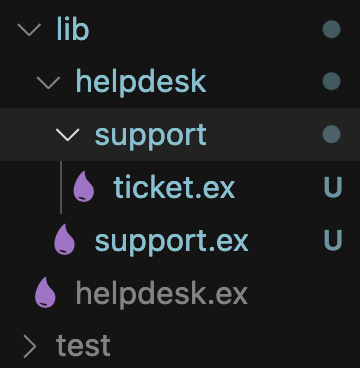
다음과 같은 폴더 구조일 것이다. lib/helpdesk 내부에 support 도메인이 만들어졌다.

lib/helpdesk/support.ex 파일에 다음 코드를 작성한다.

# lib/helpdesk/support.ex

defmodule Helpdesk.Support do
  use Ash.Domain

  resources do
    resource Helpdesk.Support.Ticket
  end
end

Helpdesk.Support 는 Ash.Domain 이고 Helpdesk.Support.Ticket 이라는 Resource 를 가지는 것으로 선언한다.

defmodule Helpdesk.Support.Ticket do
  # 이것은 이 모듈을 리소스로 만듭니다
  use Ash.Resource, domain: Helpdesk.Support

  actions do
    # :read 액션의 기본 구현을 사용합니다
    defaults [:read]
    # 그리고 나중에 커스터마이징할 create 액션
    create :create
  end

  # 속성들은 리소스에 존재하는 간단한 데이터 조각들입니다
  attributes do
    # `:id`라는 자동 생성되는 UUID 기본 키를 추가합니다
    uuid_primary_key :id
    # `:subject`라는 문자열 타입 속성을 추가합니다
    attribute :subject, :string
  end
end

Helpdesk.Support.Ticket 은 Ash.Resource 이고 Helpdesk.Support 도메인에 속한다. 이 리소스를 다루는 몇가지 action 들을 선언할 수 있고 속성 데이터도 정의할 수 있다.

실행

% iex -S mix

iex(1)> Helpdesk.Support.Ticket|> Ash.Changeset.for_create(:create)|> Ash.create!()

Helpdesk.Support.Ticket 리소스를 한 개 만들어 내기 위해 먼저 Changeset 을 만들고 Changeset 을 가지고 Ash.create! 함수를 통해 레코드를 만든다. Ecto.Changeset의 역할을 Ash 에선 Ash.Changeset이 담당하는 것 같다.

warning: Domain Helpdesk.Support is not present in

    config :helpdesk, ash_domains: [].


To resolve this warning, do one of the following.

1. Add the domain to your configured domain modules. The following snippet can be used.

    config :helpdesk, ash_domains: [Helpdesk.Support]

2. Add the option `validate_config_inclusion?: false` to `use Ash.Domain`

3. Configure all domains not to warn, with `config :ash, :validate_domain_config_inclusion?, false`

warning 발생해도 결과는 얻어지지만 warning 을 없애기 위해 다음 코드를 config.exs 에 추가한다.

# in config/config.exs
import Config

config :helpdesk, :ash_domains, [Helpdesk.Support] # 추가
% iex -S mix

iex(1)> Helpdesk.Support.Ticket|> Ash.Changeset.for_create(:create)|> Ash.create!()

%Helpdesk.Support.Ticket{
  id: "7d3d0639-5201-4eb3-9532-a7c837c98eaa",
  subject: nil,
  __meta__: #Ecto.Schema.Metadata<:built, "">
}

도메인과 리소스를 정의하고 몇가지 선언만 추가해도 기본 뼈대가 되는 기능을 얻을 수 있다.

다음 글에서 계속…